 xT Development
Logging
What xT Admin records, where it sends it, and how to forward it into your own system.
Every action, every blocked attempt and every report event goes to the same place, and from there fans out to as many destinations as you turn on:
- The database - which is what the Logs tab reads.
- A Discord webhook.
- The server console.
- Your own
handlerfunction - and a local server event.
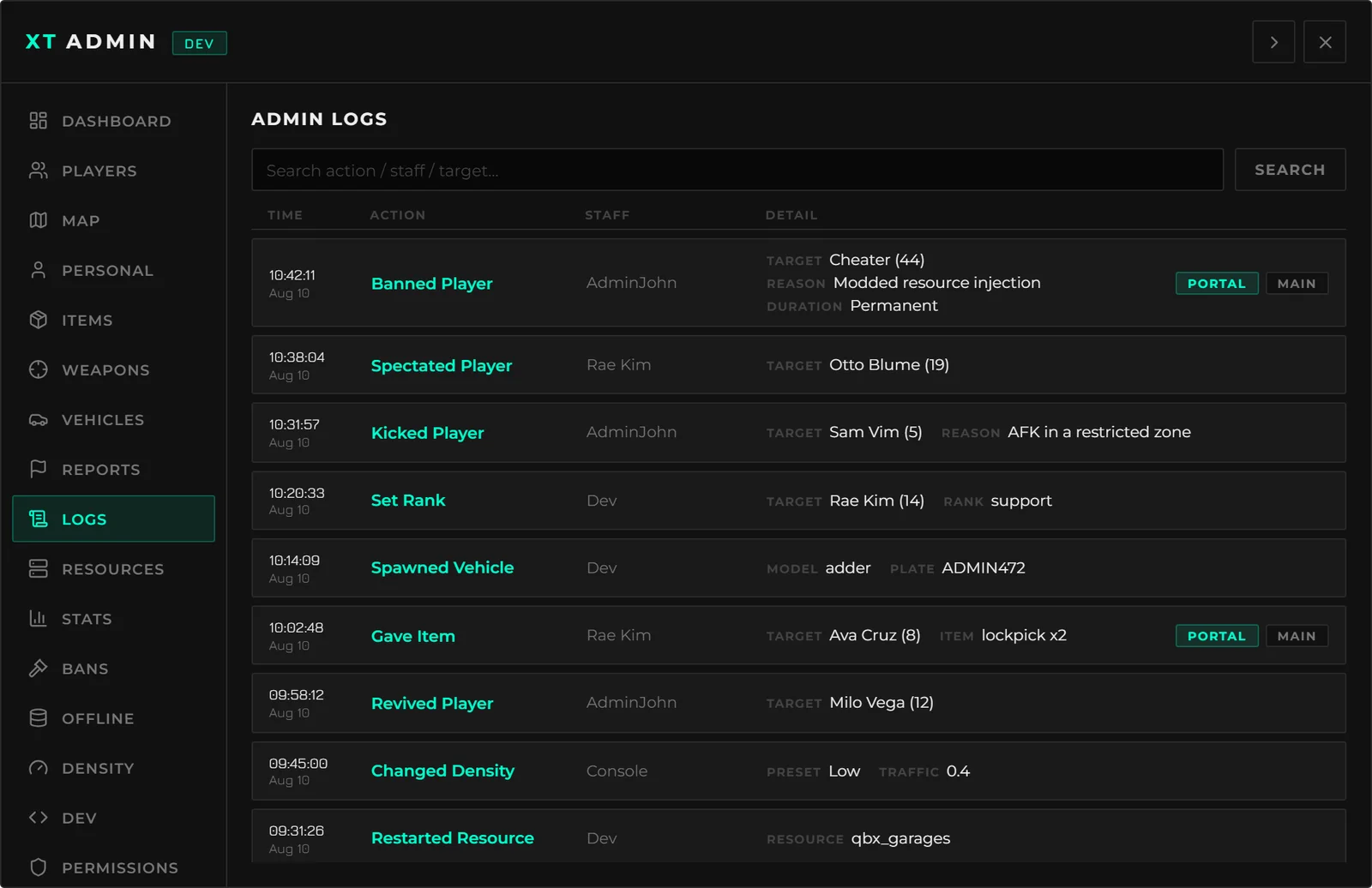
database = false empties the Logs tab. That tab reads xt_admin_logs and nothing else -
there is no in-memory copy.
Configuration
logging = {
    webhook             = '',        -- Discord webhook URL. '' disables it
    webhookName         = 'xt-admin',
    webhookColor        = 65475,     -- 0x00FFCC - successful actions
    webhookColorBlocked = 16007990,  -- 0xF44336 - blocked / failed attempts

    -- Attach the image to the webhook when an admin screenshots a player.
    -- Turn OFF to keep captures in-game only; the text row is unaffected.
    attachCaptures = true,

    database = true,     -- write to xt_admin_logs (this is what the Logs tab reads)
    console  = false,    -- also print every log to the server console

    logBypassAttempts = true,    -- log rejected / permission-denied attempts
    logFailedActions  = false,   -- log actions that ran but reported failure
    logMenuOpen       = false,   -- log every admin menu open

    ---Runs for every log, after it has been persisted.
    ---Errors are caught, but do not block in here.
    ---@param log table
    handler = function(log)
        -- exports['your-logs']:send('admin', log.action, log.detail, log.staffName)
    end,
},
logBypassAttempts is on by default and worth leaving on. A rejected attempt is the row that
tells you a rank is misconfigured - or that somebody is poking at events they should not be.
What a log row looks like
Your handler receives one table per log. The same shape reaches the local
xt-admin:server:log event.
| Field | Type | What it is |
|---|---|---|
event | string | The action id - ban, kick, setRank, or your own custom action's id |
action | string | The human-readable label, already translated |
detail | string | nil | A markdown block of the fields the admin filled in |
staff | string | nil | The staff member's license: identifier |
staffName | string | Their character name, falling back to their Steam/FiveM name |
staffSource | number | nil | Their server id. nil for a portal request |
via | 'portal' | nil | nil means it happened in game. Present means it came from a browser |
target | string | nil | The target's license: identifier |
targetName | string | nil | The target's name, captured before the action ran |
targetSource | number | nil | The target's server id |
blocked | boolean | The attempt was refused - permission, bad target, bad input |
failed | boolean | It ran and reported failure |
icon | string | nil | The action's icon |
resource | string | Which resource filed it. Stamped from the invocation, so a log can never claim to have come from a resource that did not send it |
time | number | Unix timestamp |
Only a subset is written to the database: staff, staff_name, via, action,
detail, target and created_at. The rest is there for your handler.
Forwarding into your own system
handler = function(log)
    -- Only the things that matter to you
    if log.event ~= 'ban' and log.event ~= 'kick' then return end

    exports['your-logs']:send({
        category = 'moderation',
        staff    = log.staffName,
        target   = log.targetName,
        action   = log.action,
        detail   = log.detail,
        portal   = log.via == 'portal',
    })
end,
Or listen for the event instead, from any resource on the server:
AddEventHandler('xt-admin:server:log', function(log)
    -- Same table. Local, not net - nothing about a log belongs on the wire.
end)
handler runs on the path of every logged action. Errors are caught and printed, but a slow
or blocking call in here slows down the action being logged. Do not .await a slow query in
it.
Writing your own rows
Any resource can push a row into the same audit trail. See Exports & Events.
exports['xt-admin']:log({
    event  = 'myThing',
    detail = 'Something happened',
    source = source,
    target = targetId,
})
event alone is enough - the label resolves from locales/en.json, so adding a
logs.action.myThing key gets you a translated row without touching Lua.
Discord webhook
Set webhook to a webhook URL and every log is posted as an embed: green for a successful
action, red for a blocked or failed one.
Screenshots taken with the Screenshot action attach their image to the embed when
attachCaptures is on. Turn it off and the capture stays in game only - the text row is filed
either way.
A webhook URL is a secret. Anyone who has it can post to that channel. Keep
configs/server.lua out of screenshots and support channels, or leave the field empty and
forward through handler from somewhere you already keep secrets.
Retention
Nothing is pruned automatically. xt_admin_logs is indexed on created_at, so a scheduled
tidy-up is cheap if you want one:
DELETE FROM xt_admin_logs WHERE created_at < NOW() - INTERVAL 90 DAY;